

Reviews
Bright Canvas for Young Artists succeeds as a distraction-free creative tool for early learners. The interface is remarkably intuitive—my four-year-old navigated it alone on the first try. The picture library offers enough variety to prevent boredom, and the ability to save artwork gives kids a tangible sense of progress. I particularly appreciate the absence of ads or external links, which makes it safe for unsupervised play. The only minor limitation is the need for an internet connection, but the fast loading time compensates. For parents seeking a constructive screen activity that builds fine motor skills and color awareness, this is an excellent choice.
About this game
Simple Start for Small Hands
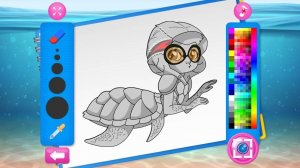
Bright Canvas for Young Artists opens with a gallery of outline pictures. Children browse thumbnails and select one that catches their eye. A palette of colors appears on the side. Tapping a color selects it, then touching a section of the picture fills that area. The controls use large buttons and clear visual cues, so even preschoolers can navigate without help. Touch screens on tablets and phones work naturally, as do mouse clicks on desktop computers. No reading skills are required, making it accessible to children as young as three.
Building Skills Through Play
This activity supports early development in several ways. Choosing colors for different areas strengthens decision-making and color recognition. Filling sections carefully improves hand-eye coordination and fine motor control. Completing a picture from start to finish builds concentration and patience. The open-ended nature encourages experimentation—kids can try unexpected color combinations without fear of mistakes. Each finished piece becomes a small achievement that reinforces a sense of accomplishment.
Gallery of Themes to Explore
The picture collection covers a range of friendly themes that appeal to young imaginations. Animals, nature scenes, simple objects, and playful patterns give children variety. New pictures may be added over time, keeping the experience fresh. Each image is divided into clearly outlined sections, making it easy to see where each color belongs. The outlines are thick and distinct, reducing frustration for small hands still developing precision.
Portable and Hassle-Free
Bright Canvas for Young Artists runs entirely in a web browser. There are no files to download, no software to install, and no account creation required. This means it works on any device with an internet connection—home computer, school tablet, or smartphone during travel. The lightweight design loads quickly even on slower connections. Parents appreciate the zero setup time, and children can start coloring within seconds of opening the page.
Preserving the Creative Journey
When a picture is complete, children can save it as an image file with a single tap. These saved works accumulate over time, forming a personal gallery that reflects their growing skills. Sharing saved pictures with family members becomes a natural way to celebrate progress. The ability to revisit earlier works also lets children see how their coloring has improved, which can be motivating.
Compatibility
✅ Works on PC & Mobile | Recommended: Chrome / Safari / Edge
Faq
Is Bright Canvas for Young Artists free to use?
Yes, the game is completely free. There are no hidden costs, in-app purchases, or subscription fees. All features, including the full picture library and save function, are available without any payment.
What devices are compatible with Bright Canvas for Young Artists?
The game works on any device with a modern web browser, including Windows and Mac computers, Android and iOS phones, and tablets. It supports both touch input and mouse clicks, so it adapts to whatever device your child uses.
Does Bright Canvas for Young Artists require an internet connection?
Yes, an internet connection is needed because the game runs in the browser. However, the connection requirements are minimal, and the game loads quickly even on slower networks. No offline mode is available at this time.
Can multiple children use the same device without mixing up their artwork?
The game does not have user profiles, so saved images are stored on the device. If multiple children share a device, you can manually organize saved files into separate folders. Each saved image includes a timestamp to help identify who created it.
Are there any ads or external links in Bright Canvas for Young Artists?
The game is designed with children's safety in mind. It contains no advertisements, no external links, and no social media integration. The experience is fully contained within the coloring activity, with no distractions or risks.
What age group is Bright Canvas for Young Artists best suited for?
The game is ideal for children aged 3 to 8. The simple controls and large buttons work well for preschoolers, while the variety of pictures and color options keep older children engaged. Older kids may enjoy more detailed pictures and experimenting with advanced color combinations.






Comments
0 comments