Starloom Arcade

Details

Galactic Maze Arcade Game

Galactic Maze Arcade Game

Developer: Alpha Core Studio
Published: 2024-05-02
Updated: 2026-06-12
Skill

Reviews

Galactic Maze offers a calming yet engaging experience with its simple steering mechanics and progressively harder mazes. The visuals are stunning, with colorful nebulae and stars that make each session feel fresh. Replayability is high due to the increasing difficulty and no time pressure, allowing players to improve their navigation skills at their own pace. It is a great choice for casual gamers looking for a short, satisfying escape.

About this game

Game Introduction

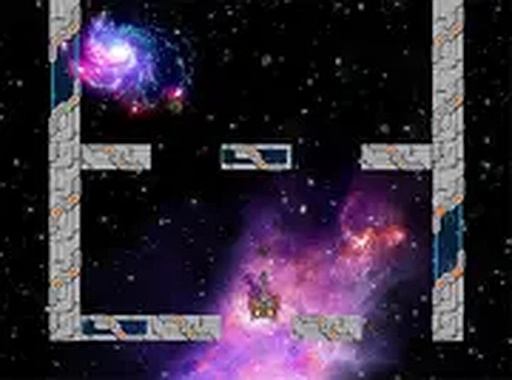
Galactic Maze Online Arcade Game is a skill-based browser game that puts you in control of a spaceship navigating a labyrinth of blocks. The core objective is to avoid obstacles while enjoying cosmic backdrops of galaxies and nebulae. This game is designed for quick play sessions and offers a fun challenge for players of all ages. It runs directly in the browser without any downloads, making it easy to start playing immediately on both mobile and desktop devices. The full screen mode enhances immersion, allowing you to focus on steering through the maze.

How to Play

To play, use your mouse or touch controls to steer the spaceship through the maze. The controls are simple and responsive, allowing you to dodge blocks and navigate tight spaces. The game starts easy but gets harder as you progress, with more complex mazes and faster movements. There is no time limit, so you can take your time to find the best route. The game is intuitive, so you can start playing right away without instructions. Just guide your ship safely through the labyrinth and enjoy the journey through space.

Game Features

Features include stunning space backgrounds, simple one-touch controls, and increasing difficulty levels. The game supports full screen mode for an immersive experience and works smoothly on both mobile and desktop browsers. It is designed for quick play sessions, making it a convenient choice for casual gaming.

Tips for Success

To succeed in Galactic Maze, practice regularly to improve your reflexes and spatial awareness. Learn the maze patterns by observing the layout before moving. Stay calm and plan your moves ahead to avoid sudden obstacles. Use the full screen mode to minimize distractions and focus on the path. Since the game gets harder over time, gradually build your skills by starting with easier sections and progressing at your own pace.

Compatibility

• OS: Windows 10+, macOS 11+, iOS 14+, Android 10+
• Browsers: Chrome 100+, Safari 15+, Edge 100+, Firefox 100+
• Not compatible with Internet Explorer
Tested on real devices ✅ works as expected
Advertisement

Faq

Is Galactic Maze free to play?
Yes, Galactic Maze is a free online arcade game that you can play directly in your browser without any cost or downloads. It is accessible on both mobile and desktop devices, making it easy to enjoy without any financial commitment.
Can I play Galactic Maze offline?
No, Galactic Maze requires an internet connection because it runs directly in your browser as an online game. It is not available for offline play, but it loads quickly and does not require any downloads or installations.
Does Galactic Maze have a leaderboard or scoring system?
The game description does not specify a leaderboard or scoring system. Typically, skill-based maze games may track your progress or distance traveled, but this is not confirmed. The main focus is on navigating the maze and avoiding obstacles.
What devices are supported for Galactic Maze?
Galactic Maze works on both mobile devices and desktop computers. It is designed to be responsive, so you can play using touch controls on smartphones and tablets or with a mouse on a computer. The game runs in any modern web browser.
Is there a time limit in Galactic Maze?
No, there is no time limit in Galactic Maze. You can take your time to navigate the maze and plan your moves carefully. This makes the game relaxing and suitable for players who prefer a more casual pace without pressure.
How do I enable full screen mode in Galactic Maze?
Full screen mode is typically available through a button or icon within the game interface. Look for a full screen option in the game's controls or settings menu. This feature helps immerse you in the cosmic maze by removing browser distractions.

Leave a Comment