Starloom Arcade

Details

FreeCell Solitaire Classic Puzzle

FreeCell Solitaire Classic Puzzle

Developer: Lead Weaver Works
Published: 2025-07-11
Updated: 2026-06-12
Arcade Classic Logic

Reviews

FreeCell Solitaire Classic offers a pure card puzzle experience that relies on skill. Each deal is solvable, encouraging repeated play to improve strategy. The interface is clean and responsive, with full screen support. It is a great choice for players who enjoy thoughtful, relaxing games.

About this game

Game Introduction

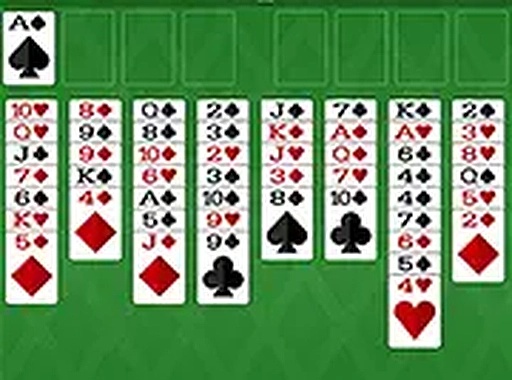
FreeCell Solitaire Classic is a thoughtful variation of traditional solitaire that emphasizes planning and strategy. The game presents a tableau of eight columns containing all 52 cards. Your objective is to move every card to the four foundation piles, building each from Ace to King in the same suit. What sets FreeCell apart is the inclusion of four free cells, which act as temporary storage spaces. These cells allow you to hold cards while you rearrange the tableau, giving you more control over your moves. Unlike games that depend on random draws, FreeCell rewards careful thinking. Every deal is winnable with the right strategy, making it a satisfying challenge for players who enjoy logic-based puzzles.

How to Play

To play, start by examining the tableau and free cells. Look for Aces and move them to the foundation spots. Cards in the tableau can be moved between columns if they follow descending order and alternate colors. For example, a red 7 can be placed on a black 8. Use the free cells to temporarily hold cards that block your progress. You can move one card at a time from the tableau to a free cell, or from a free cell back to the tableau. The goal is to clear the tableau by moving all cards to the foundations. The game is won when all four foundation piles are complete from Ace to King.

Game Features

Strategic gameplay with four free cells for flexible card management. Full screen mode for an immersive view on desktop and mobile. Play directly in your browser without downloads. Clean interface with smooth card animations. Suitable for all ages and skill levels.

Tips for Success

Plan your moves several steps ahead to avoid getting stuck. Use free cells wisely—only move a card there if it helps you access a needed card underneath. Try to keep free cells empty when possible for maximum flexibility. Focus on building foundations early by moving Aces and low cards. Practice regularly to improve your strategic thinking and pattern recognition.

Compatibility

This H5 game runs smoothly on:
• Desktop computers (Windows / Mac) • Mobile phones (iPhone / Android)
• Tablets (iPad / Android)
🌐 Best experienced with Chrome, Safari, or Edge
Advertisement

Faq

Is FreeCell Solitaire Classic free to play?
Based on the game description, it is playable directly in your browser without downloads, which typically indicates free access. Many online versions of FreeCell are free to play, though some may include optional ads or in-game purchases. Check the specific platform for details.
Can I play FreeCell Solitaire Classic on my mobile device?
Yes, the game supports full screen mode for an immersive view on both desktop and mobile devices. This allows you to enjoy the game on smartphones and tablets, making it convenient for playing on the go.
What happens if I get stuck in a game of FreeCell?
If you get stuck, you can often restart the deal or use an undo feature if available. Some versions may offer hints or allow you to shuffle the tableau. Since every deal is winnable, trying a different strategy or taking a break can help you find a solution.
Are there different difficulty levels in FreeCell Solitaire Classic?
The game typically does not have adjustable difficulty levels, as the challenge comes from the random deal of cards. However, some versions may offer a selection of deals with varying complexity, or allow you to choose from different card sets or backgrounds for a personalized experience.
Does FreeCell Solitaire Classic include any sound effects or music?
The game description mentions a clean interface with smooth card animations, but does not specify sound effects or music. Many online card games include optional sound, so it may be available. You can usually toggle sound settings on or off in the game menu.
Can I track my statistics or progress in FreeCell Solitaire Classic?
The game description does not mention statistics tracking. However, many digital solitaire games offer features like win/loss records, fastest completion times, or streaks. Check the game interface for any stats or achievements section, which may be included in some versions.

Leave a Comment