Starloom Arcade

Details

Traffic Control Arcade Game

Traffic Control Arcade Game

Developer: Freezefall Labs
Published: 2024-10-30
Updated: 2026-06-12
Management Simulation

Reviews

Traffic Control is a well-designed arcade game that offers a satisfying challenge. The controls are intuitive, and the difficulty ramps up smoothly, keeping you engaged. It is perfect for short breaks and helps improve focus and timing. The family-friendly theme makes it suitable for all ages, and the free browser-based play adds convenience. A solid choice for casual gamers.

About this game

Game Introduction

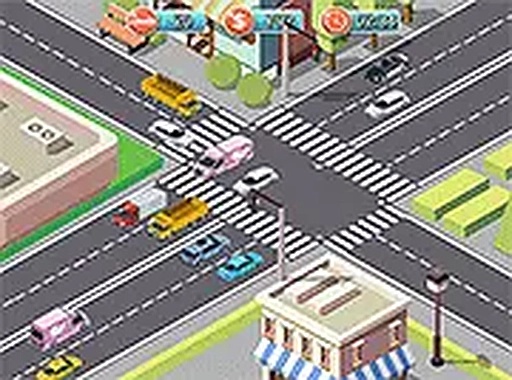
Traffic Control is an engaging HTML5 arcade game that puts you in charge of managing traffic lights at a busy intersection. Your primary goal is to prevent vehicle collisions by switching lights from red to green at the right moments. As the traffic flow increases, you must stay alert and make quick decisions to keep cars, trucks, and other vehicles moving safely. The game is designed for players of all ages and offers a simple yet challenging experience that tests your multitasking abilities. It runs directly in your browser without any downloads, making it easy to start playing anytime. You can also enjoy a full-screen mode for a more immersive view. Traffic Control provides a fun and family-friendly way to pass the time while sharpening your reaction skills.

How to Play

Playing Traffic Control is straightforward. Click on any traffic light to change its color. Red means stop, green means go. Your task is to time these changes so that vehicles pass through the intersection without hitting each other. The game starts with a few cars, but as you progress, more vehicles appear and the pace quickens. If two vehicles crash, the game ends, so stay focused. The controls work on both desktop and mobile devices, including touchscreens. Simply load the game in your browser and start managing traffic. No downloads or installations are needed, making it a perfect quick-play option for any moment.

Game Features

Simple click controls that are easy to learn. Family-friendly gameplay suitable for all ages. Free online access with no downloads required. Playable on desktop and mobile devices. Full-screen mode for an immersive experience. Increasing difficulty that keeps the game challenging.

Tips for Success

To succeed in Traffic Control, practice anticipating traffic patterns and timing your light changes carefully. Start by focusing on one lane at a time, then gradually manage multiple lanes as you get comfortable. Stay calm under pressure, as rushing may lead to mistakes. Regular practice will improve your reaction time and decision-making skills, helping you handle the increasing traffic flow more effectively.

Compatibility

▸ Desktop: Chrome / Edge / Firefox / Safari
▸ Mobile: iOS Safari / Android Chrome
▸ Tablet: iPadOS Safari / Android Tablet Browser
Keep your browser updated for the best experience
Advertisement

Faq

Is Traffic Control free to play?
Yes, Traffic Control is completely free to play. There are no hidden fees or in-app purchases required to enjoy the game. You can access it directly in your browser without any cost, making it a budget-friendly option for casual gaming.
Can I play Traffic Control on my mobile phone?
Yes, Traffic Control is designed to work on both desktop and mobile devices. The game supports touchscreen controls, so you can easily tap to change traffic lights on your smartphone or tablet. No additional setup is needed.
What happens when two vehicles crash in Traffic Control?
If two vehicles collide at the intersection, the game ends immediately. This is the primary failure condition, so you must carefully manage the traffic lights to avoid any crashes. The game encourages you to stay focused and make timely decisions.
Does Traffic Control require any downloads or installations?
No, Traffic Control runs entirely in your web browser using HTML5 technology. There is no need to download or install any software. Simply open the game in your browser, and you can start playing right away.
Is there a way to reset or restart the game after a crash?
Yes, after a crash ends the game, you can typically restart by clicking a button or refreshing the page. The game is designed for quick sessions, so restarting is easy and allows you to try again immediately to improve your score.
Does Traffic Control have different difficulty levels?
Traffic Control features increasing difficulty as you progress. The game starts with a few vehicles, but over time more cars and trucks appear, and the pace quickens. This gradual challenge helps you improve your multitasking skills without an abrupt jump in difficulty.

Leave a Comment